
The Manage Files section allows for all of the basic file management functions in Audit Manager. This includes; creation of provider or coder audits with or without records, split records, and to append additional records to an existing Provider or Coder audit.
File management options can be found by clicking the ellipsis (...) next to any given file. Certain options can also be completed in bulk if all or several files are selected.
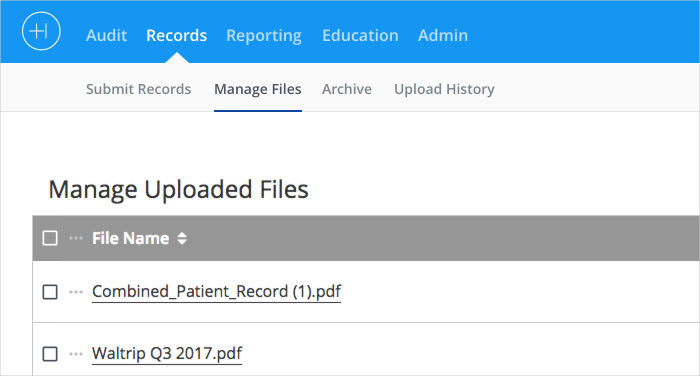 Manage Files Image 1.
File management options are:
'Download' - Download one, some or all files to your local device.
'Assign' - Opens a new page where the selected file(s) can be associated to a project and provider or coder.
'Split' - Opens a new page where multi-page records can be split and assigned to different projects.
'Append' - Opens a window that allows records to be added to existing audits as additional documentation.
'Delete' - Permanently deletes the record. This is only recommended if a file was uploaded in error.
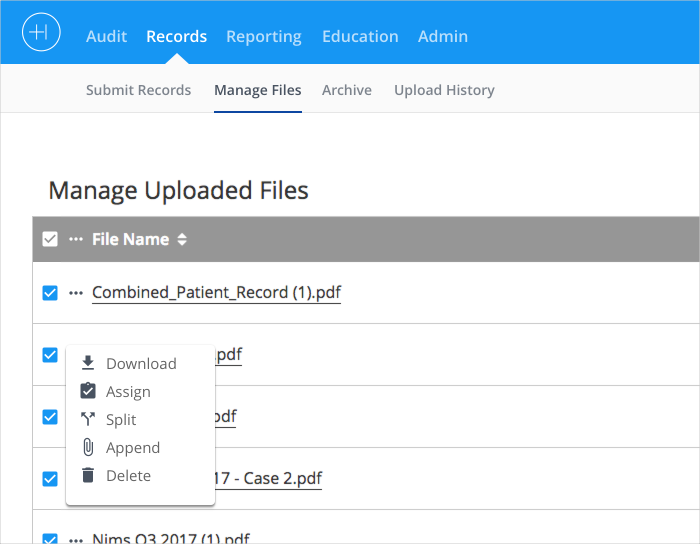 Manage Files Image 2.
Other options:
'Create Audits Without Records' - Allows an audit workflow to begin even though the records may not be available at the time. Records can be added later using the Append feature.
'Import Claims and Assign Audit' - Upload a claims file and automatically assign the claims to an existing audit project.
Comments
0 comments
Please sign in to leave a comment.