
REPORTING MISSING DATA
The auditor can report that some sort of data is missing from the patient chart as they are auditing. They click the bubble comment icon while in the audit box.
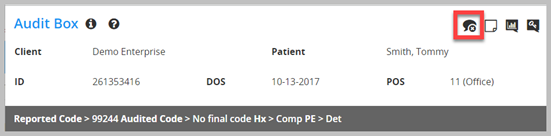
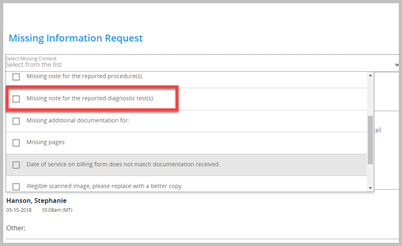
They make a selection in the pop-up, their selection is time stamped with their name.
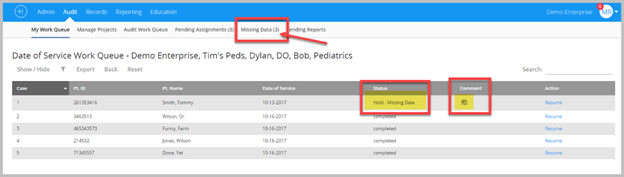
The encounter is marked with a missing data icon, and the status is set to “Hold-Missing Data” and a notification is added in the Missing Data section of the website.
TRACKING MISSING DATA
Whoever is responsible to track on missing data notification and follow-up on the data can track their follow-up by going to Audit > Missing Data > check the box to the left of the encounter > click action > make update. Once they finally receive the needed data > they select Append a File
Note: the follow up steps do not send emails, they are only for tracking purposes.
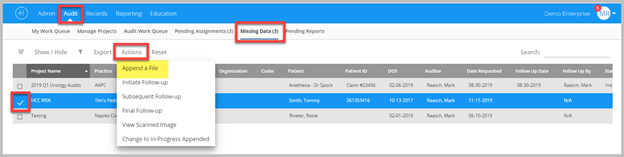
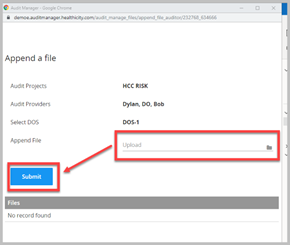
Once they select “Append a File” > a pop-up prompts them to attach/append this file to encounter > that encounter disappears from the Missing Data section and this email is triggered to the Auditor.
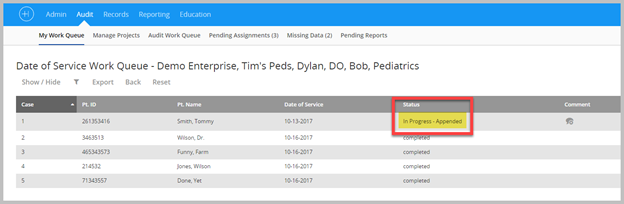
Back in the Auditors “My Work Queue” – the encounter status is updated to “In Progress – Appended”
Viewing The Appended Records
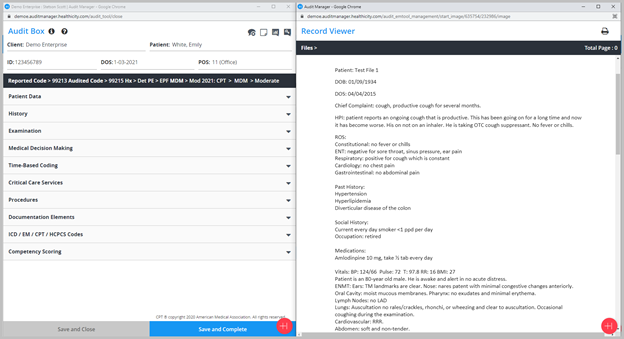
The appended document is viewable by the auditor when they open the date of service for the patient to whom to file was appended.
Comments
0 comments
Please sign in to leave a comment.